Your File System Is an Accessibility Tool — Apple Just Never Told You That
There is a feature built into every Mac that productivity communities quietly celebrate and neurodivergent users swear by. Most people have never touched it. Apple ships it turned on, tucks it into the sidebar, and moves on without explanation.

It is called Tags — and for a certain kind of brain, it is the difference between a usable computer and a graveyard of lost files.

The Problem With Folders
Traditional digital filing is built on hierarchy: Folders inside Folders inside Folders. It is a system that mirrors how a filing cabinet works, and it assumes your brain works the same way.
For many people with ADHD or autism, it does not.
The core issue is object permanence. When a file disappears into a nested folder path — /Documents/Projects/2024/Archive/Draft_v3_final_REAL.pdf — it functionally ceases to exist. Not because you forgot it, but because the brain needs a visible cue to sustain awareness of something. Out of sight is genuinely out of mind, not as a metaphor but as a neurological reality.
The result is predictable: files pile up on the Desktop because that is the one place things stay visible. Folders get created and then abandoned because the act of choosing where something goes triggers decision paralysis. The "right folder" problem — does this go in Photos, Writing, or Memories? — causes enough friction that the file ends up nowhere organized at all.
What Apple Tags Actually Do
macOS Tags and Finder Color Labels have been part of the operating system since OS X Mavericks (2013), and they solve the folder problem in three specific ways.
1. Color as a Pre-Attentive Signal
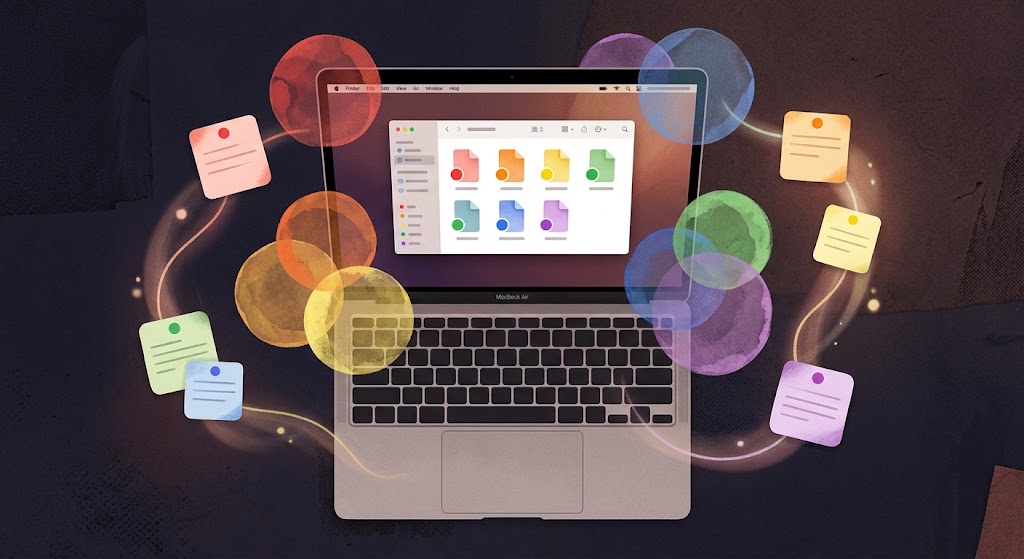
Color is processed by the brain before conscious attention engages. You do not have to read a tag — you recognize it. Assigning a vivid color label to a file (Red, Orange, Yellow, Green, Blue, Purple) gives an instant visual cue about what that file is or needs before a single word is parsed.
For a brain that struggles to process text-based labels quickly, this is not a small thing. It removes a cognitive step entirely.
2. A File Can Live Everywhere At Once
In a folder system, a file has one home. A journal entry about a difficult day — is it a mental health log, a creative writing piece, or a personal memory? You are forced to choose, and the wrong choice means you will not find it when you need it.
With Tags, a file can carry multiple labels simultaneously. That same journal entry can be tagged Blue (reflection), Purple (precious), and Red (needs attention) at the same time. It exists once on your hard drive. It appears under all three tags. There is no wrong answer and no decision paralysis.
3. Tags Live in the Sidebar — Always
Every tagged file is one click away from any Finder window, always. Click the Purple tag in the sidebar and every file you have ever marked Purple comes to the front of the screen — regardless of where it is actually stored. No navigation, no path-hunting, no loss of focus mid-task.
This is the spatial organization model. The file does not move. Your view of it does.
A Suggested Color System for Emotional and Cognitive States
Rather than mapping tags to categories (which reintroduces the folder problem), consider mapping them to states:
- 🔴 Red — Urgent / Active: Raw brain dumps, current ideas, things that need to be processed now
- 🟠 Orange — In Progress: Drafts, ongoing projects, things you touched recently
- 🟡 Yellow — Reference: Things you need to be able to find quickly but are not working on
- 🟢 Green — Growth / Creative: Future projects, sparks of intuition, things you want to develop
- 🔵 Blue — Deep / Calm: Journals, philosophical notes, mental health logs, slow thinking
- 🟣 Purple — Precious: Keepsakes, memories, letters, things that make you feel good
The categories are yours to define. The point is that they map to a feeling or a state rather than a file type — which is how neurodivergent minds actually sort things when left to their own logic.
How to Use It on Your Mac
- Right-click (or two-finger tap) any file, photo, or document in Finder
- Select a color dot from the pop-up menu, or type a custom tag name (e.g., "Moments," "Brain Dump," "Keep")
- Open any Finder window — look to the bottom-left sidebar for your tags
- Click any tag to instantly surface every file carrying that label, regardless of where it lives
You can also add tags from the Save dialog when creating a new file, or by dragging a file onto a tag in the sidebar.
This Is an Accessibility Feature — We Just Do Not Call It That
The Apple Tag system is not marketed as accessibility. It is listed under "organization." But the distinction it makes — between a flat, visual, multi-label system and a rigid hierarchical one — is exactly the distinction that determines whether a computer is usable or unusable for a significant portion of the population.
Compare this to what happened with AirPods.
In September 2024, the FDA authorized the first over-the-counter hearing aid software ever cleared by the agency — and it runs on AirPods Pro 2. [¹] A $249 consumer product became a regulated medical device through a software update, making hearing support accessible for adults with mild to moderate hearing loss at a fraction of the cost of traditional hearing aids. [²]
The pattern is the same: Apple builds a consumer product. A feature inside it turns out to be genuinely assistive for a population that has historically had to spend significantly more money to get equivalent support. The ADA covers ADHD and autism as qualifying disabilities for workplace accommodations [³], and the research is clear that accommodations — including assistive technology — are linked to better job stability, satisfaction, and productivity for neurodivergent employees. [⁴]
But the gap between what the law permits and what gets prescribed, covered, or even mentioned to neurodivergent people remains wide. <a href="https://www.ncbi.nlm.nih.gov/books/NBK453296/">Insurance coverage for assistive technology is shaped by competitive bidding processes that favor the lowest-cost options</a>, which limits the ability of clinicians to match tools to actual needs. [⁵]
The result is that many people discover tools like Apple Tags — or noise-canceling earbuds that prevent sensory overload, or AirPods that now function as hearing aids — entirely by accident, through communities, through trial and error, or through a conversation with an AI.
That is what this post is: the recommendation your doctor did not have time to make, and your IT department did not know to give.
The Broader Point
File organization is not a preference. For a neurodivergent person, the structure of their digital environment directly affects their ability to think, work, remember, and function. A system that causes friction — that buries things, demands perfect recall of folder paths, or penalizes you for not knowing in advance how to categorize something — is not a neutral system. It is an inaccessible one.
Apple's Tag system offers an alternative that requires no third-party app, no subscription, and no setup beyond a right-click. It has been sitting in the sidebar since 2013, quietly waiting to be used.
If your brain works spatially, associatively, or visually rather than hierarchically — this is for you.
Further Reading
- The Simple Mac Organization System That Finally Stopped My Brain From Exploding — The Useful Tech, Medium (Nov 2025)
- My Autism Diagnosis Upended My Sense of Self, But One Gadget Is Helping Me Reclaim It — SlashGear (Dec 2025)
- FDA Authorizes First Over-the-Counter Hearing Aid Software — FDA.gov (Sep 2024)
Citations
[1] FDA. (2024, September 12). FDA authorizes first over-the-counter hearing aid software. U.S. Food and Drug Administration. https://www.fda.gov/news-events/press-announcements/fda-authorizes-first-over-counter-hearing-aid-software
[2] National Hearing Institute. (2026). Are AirPods Pro hearing aids? What the FDA authorization actually means.https://nationalhearinginstitute.org/articles/are-airpods-pro-hearing-aids/
[3] Josi Health. (2026). Workplace accommodations after an autism or ADHD diagnosis: What you're entitled to.https://josihealth.com/workplace-accommodations-autism-adhd/
[4] Whitmarsh, B. (2026, April 2). 10 AuDHD workplace accommodations you can actually ask for. Substack. https://brettwhitmarsh.substack.com/p/10-audhd-workplace-accommodations
[5] National Academies of Sciences, Engineering, and Medicine. (2017). The promise of assistive technology to enhance activity and work participation: Coverage for relevant products and technologies. National Center for Biotechnology Information. https://www.ncbi.nlm.nih.gov/books/NBK453296/
made-sick is an independent studio voice writing at the intersection of neurodivergence, technology, and accessibility. Comments welcome.